Video search results help users discover video content through Google Search. They can include video thumbnails, titles, descriptions, durations, and interactive features that make it easier to find relevant content.
Google can display videos in its main search results, the dedicated Videos tab, Google Images, and Discover. The format and eligibility of video features vary across these search experiences.
Understanding how Google discovers, indexes, and displays videos helps website owners make their video content more accessible to search engines and users.
What Are Video Search Results?
Video search results are listings that feature video content relevant to a user’s search query.
Unlike traditional text-based results, video results may provide visual previews and additional information about the video before a user clicks.
For example, someone searching for “how to perform keyword research” may find video tutorials explaining keyword selection, search intent, and keyword analysis.
Video search results are particularly useful for content that benefits from visual demonstrations, including tutorials, educational videos, product demonstrations, and instructional content.
How Do Video Search Results Work?
Google discovers and processes video content to determine whether it is relevant to a user’s search.
The process involves three main stages.
1. Video Discovery
Google discovers videos through webpages, HTML video elements, embedded players, video sitemaps, and other supported sources.
A video must be accessible to Google before it can be considered for indexing.
2. Video Indexing
Google processes the video and its associated webpage to understand the content.
An important distinction is that indexing a webpage does not automatically mean that Google has indexed the video embedded on it.
Google evaluates video content separately when determining eligibility for video search features.
3. Search Appearance
When Google determines that a video is relevant to a search query, it may display the video in an appropriate search experience.
The appearance can vary depending on the query, the video content, and the available search features.
Types of Video Search Results
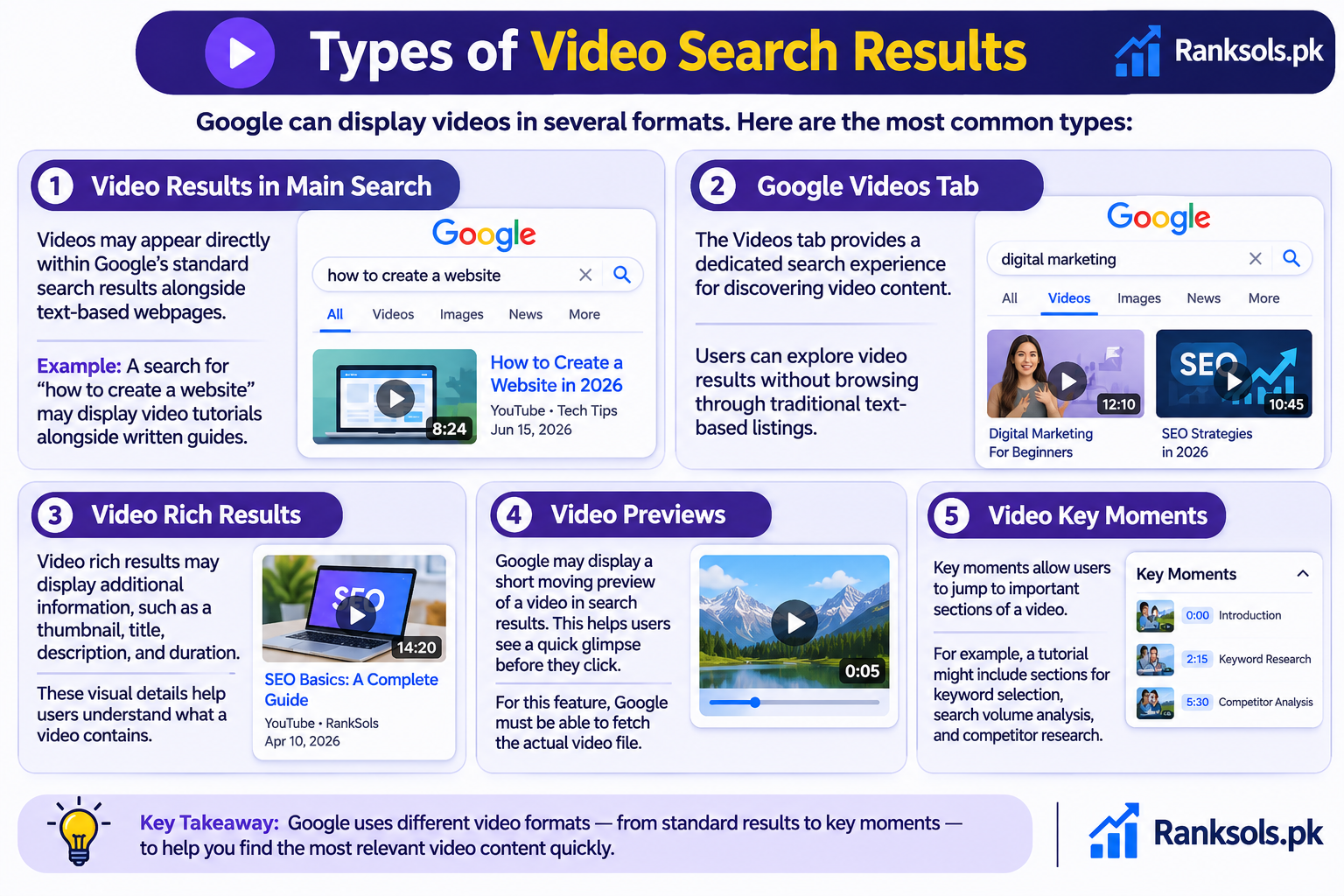
Google can display videos in several formats.
Video Results in Main Search
Videos may appear directly within Google’s standard search results alongside text-based webpages.
For example, a search for “how to create a website” may display video tutorials alongside written guides.
Google Videos Tab
The Videos tab provides a dedicated search experience for discovering video content.
Users can explore video results without browsing through traditional text-based listings.
Video Rich Results
Video rich results may display additional information, such as a thumbnail, title, description, and duration.
These visual details help users understand what a video contains before visiting the page.
Video Previews
Google may display a short moving preview of a video in search results.
Google selects a few seconds from the video to help users understand what they can expect to watch.
For this feature, Google must be able to fetch the actual video file.
Video Key Moments
Key moments allow users to navigate directly to important sections of a video.
For example, a tutorial might include sections for keyword selection, search volume analysis, and competitor research.
Google can automatically identify video segments. Publishers can also provide information about key moments through supported structured data.
What Is a Video Watch Page?
A video watch page is a webpage whose primary purpose is to show users a single video.
This distinction is important because Google does not treat every webpage containing an embedded video as a dedicated watch page.
Examples of watch pages include:
A dedicated video landing page.
A news video player page.
A sports highlight page.
An individual video streaming page.
A blog post containing a supplementary video, a product page with a demonstration video, or a page listing several videos is not necessarily a watch page.
Google’s video indexing requirements include an indexed watch page, an accessible video, and a valid thumbnail available at a stable URL.
Google also evaluates whether the watch page performs well in Search before considering its video for indexing.
Therefore, a webpage can be indexed while its video remains unindexed.
How to Improve Video Visibility in Google Search
Website owners can follow several practices to make video content easier for Google to discover and understand.
Create a Dedicated Watch Page
When appropriate, create a dedicated page for each video.
The page should focus primarily on the video rather than treating it as a minor element within unrelated content.
Use a unique page title and description that accurately describe the video.
Use VideoObject Structured Data
The VideoObject structured data type provides information about a video.
Important properties include:
| Property | Purpose |
|---|---|
name | The video’s title |
description | A description of the video |
thumbnailUrl | The video thumbnail image |
uploadDate | The video’s publication date |
duration | The video’s length |
contentUrl | The URL of the actual video file |
embedUrl | The URL of the video player |
Structured data should accurately reflect the visible video content and its associated metadata.
It can help Google understand the video and make it eligible for supported search features. However, structured data does not guarantee indexing, rich results, or improved rankings.
Provide a High-Quality Thumbnail
A relevant thumbnail helps users identify the video in search results.
Use a unique image for each video and ensure that Google can access it.
The thumbnail URL should remain stable so Google can consistently retrieve the image.
Make Video Files Accessible
Google needs to access the actual video file to support certain features, including video previews and key moments.
Avoid blocking video resources that Google needs to process the content.
If a video is hosted on a separate server or content delivery network, that resource must also be accessible to Google.
Use Video Sitemaps
A video sitemap provides Google with additional information about videos hosted on a website.
It can include information such as the video title, description, thumbnail, and video location.
Video sitemaps can be particularly useful for websites that publish multiple videos or have videos that are difficult to discover through normal crawling.
However, submitting a video sitemap does not guarantee that Google will index the videos.
How to Monitor Video Search Performance
Google Search Console provides several tools for understanding video indexing and search performance.
| Search Console tool | What it helps you understand |
|---|---|
| Video indexing report | Which indexed pages contain indexed videos and why other videos were not indexed |
| URL Inspection tool | Whether Google can access and process a specific webpage |
| Video rich result report | Issues with VideoObject structured data |
| Performance report | Video search impressions and clicks through the Videos search appearance filter |
These tools help website owners identify indexing problems, validate structured data, and monitor video visibility.
For example, if a webpage is indexed but its video is not, the Video indexing report can help identify the reason.
Common Misconceptions About Video Search Results
An Indexed Webpage Always Has an Indexed Video
This is incorrect.
Google may index a webpage without indexing the video embedded on it. Video indexing has additional requirements beyond webpage indexing.
Adding VideoObject Schema Guarantees Video Rankings
Structured data helps Google understand video content, but it does not guarantee indexing, rich results, or higher rankings.
Every Embedded Video Is Eligible for Video Search Features
Not every embedded video qualifies.
Google evaluates the accessibility of the video, its associated webpage, the thumbnail, and other indexing requirements.
Video Search Results Only Appear on YouTube
Google can display video content from different websites and platforms.
A video hosted on an independent website may appear in video search results if its page and video meet Google’s requirements.
Summary
Video search results help users discover relevant video content through Google Search and other supported Google surfaces.
Understanding the difference between webpage indexing and video indexing is essential. A webpage can appear in Google Search while its embedded video remains unindexed.
Dedicated watch pages, accessible video files, stable thumbnails, accurate VideoObject structured data, and video sitemaps can help Google discover and understand video content.
However, meeting these requirements does not guarantee that a video will appear in search results.
For further learning, explore Google’s official Video SEO Best Practices documentation.