Indexing is the process through which a search engine analyzes a webpage and stores information about it in its search index. For Google Search, a page may be indexed after Google discovers, crawls, and processes it.
Indexing does not guarantee that a page will rank or appear for every relevant search. It simply means Google has processed the page and included it in its index, making it potentially available to be considered for search results.
A simplified view of the process is:
URL Discovery → Crawling → Processing → Indexing → Serving Search Results
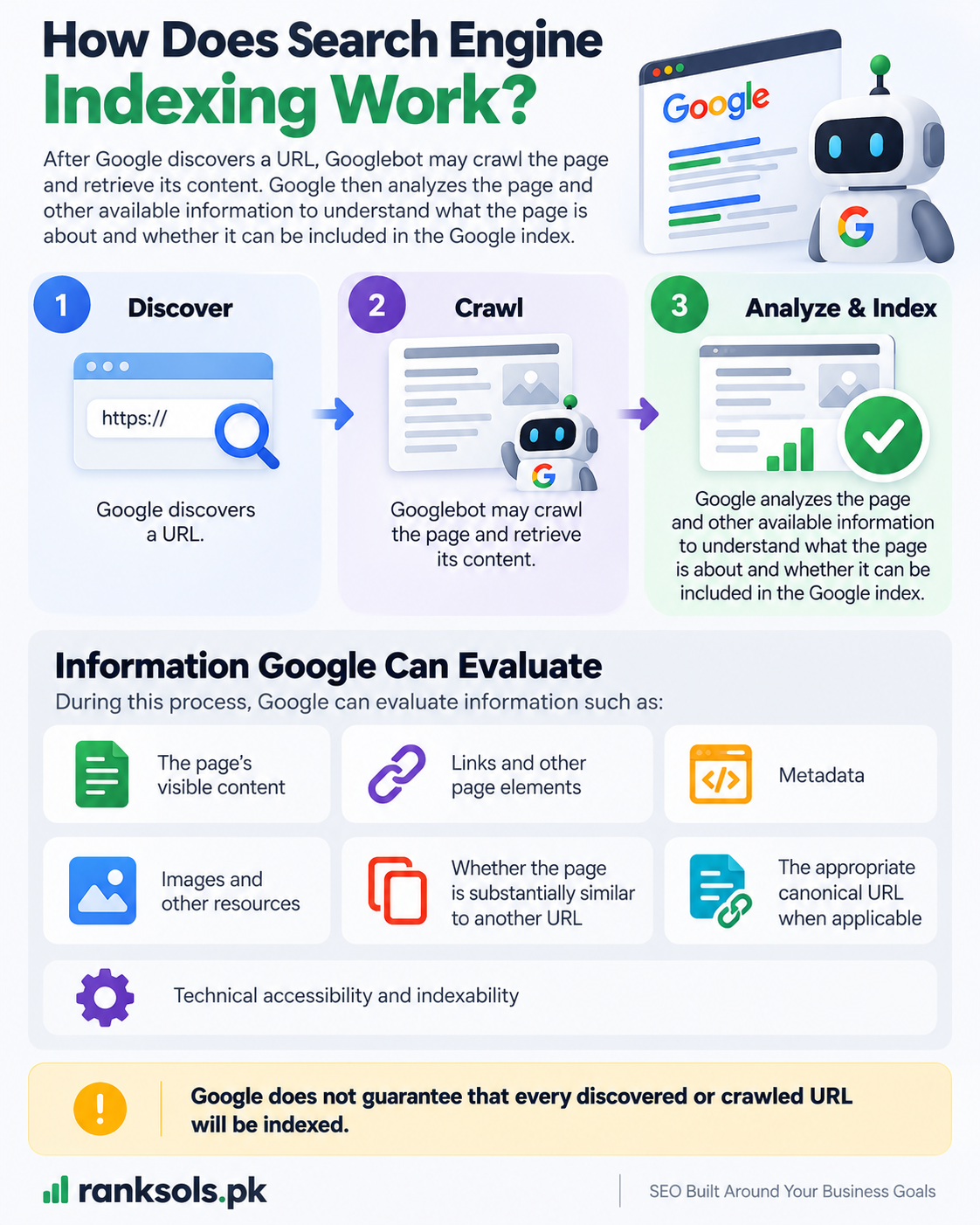
How Does Search Engine Indexing Work?
After Google discovers a URL, Googlebot may crawl the page and retrieve its content. Google then analyzes the page and other available information to understand what the page is about and whether it can be included in the Google index.
During this process, Google can evaluate information such as:
The page’s visible content
Links and other page elements
Metadata
Images and other resources
Whether the page is substantially similar to another URL
The appropriate canonical URL when applicable
Technical accessibility and indexability
Google does not guarantee that every discovered or crawled URL will be indexed.
What Does It Mean When a Page Is Indexed?
When a page is indexed, Google has processed the page and stored information about it in its search index.
However, indexing does not mean that the page:
Will rank highly
Will appear for every related keyword
Will receive organic traffic
Will be selected for a particular search query
Will remain indexed permanently
A useful distinction is:
Crawled → Google accessed the page
Indexed → Google processed and included the page in its index
Ranked/Served → Google may show the page for a relevant search
This distinction helps separate indexing problems from ranking problems.
What Can Prevent a Page From Being Indexed?
Several technical and content-related factors can affect whether a page is included in Google’s index.
noindex Directive
A noindex directive tells compliant search engines not to include a page in their search results.
If an important page accidentally contains a noindex directive, Google may exclude it from the index.
For Google to see a noindex directive, however, it must be able to crawl the page. Blocking the page in robots.txt can prevent Google from seeing the directive.
Robots.txt Restrictions
A robots.txt file controls whether crawlers are allowed to access particular URLs or areas of a website.
Robots.txt and noindex therefore serve different purposes:
Robots.txt: controls crawling access.
noindex: tells search engines not to include a page in search results.
Using robots.txt alone should not be treated as a reliable method for removing a page from Google’s index.
Duplicate and Canonical URLs
A website can sometimes have multiple URLs containing substantially similar or duplicate content.
Google may group similar pages and select a canonical URL to represent the content in search results.
For example, different URLs generated by parameters, filters, or other URL variations may contain essentially the same page.
Canonicalization helps Google understand which version should generally be treated as the main URL. It does not mean that every non-canonical URL is automatically removed from Google’s systems.
Technical Accessibility
Google’s basic technical requirements include being able to access the page, receiving a successful HTTP status such as 200, and finding indexable content.
A page that cannot be properly accessed, returns an error, or does not provide indexable content may not be eligible for indexing.
Meeting these technical requirements still does not guarantee that Google will index the page.
Content and Page Value
Google does not necessarily index every page it processes.
Pages with substantially duplicated content, very little useful information, or other quality-related issues may be less likely to be selected for indexing.
The practical goal is therefore not to get every URL indexed. It is to make sure that important, useful pages are technically accessible and provide unique value.
How Can You Check Whether a Page Is Indexed?
For your own website, Google Search Console is the most useful place to investigate indexing.
The URL Inspection tool can help you check the status of an individual URL and identify issues that may affect Google’s ability to access or index it.
The Page Indexing report can also help website owners understand indexing patterns across a larger set of URLs.
When investigating a page, look for issues involving:
Indexing
noindexCanonicalization
Page accessibility
Search Console-reported errors
A site: search can sometimes provide a quick indication that URLs from a website are appearing in Google, but it should not be treated as a complete or definitive indexing test.
Do Sitemaps Guarantee Indexing?
No.
An XML sitemap can help Google discover URLs, particularly on large or complex websites, but submitting a URL in a sitemap does not guarantee that Google will crawl or index it.
A sitemap should therefore be viewed as a discovery aid rather than an indexing guarantee.
Does Indexing Guarantee Ranking?
No.
Indexing and ranking are separate parts of the search process.
A page can be indexed but still receive little or no organic visibility for a particular query. Google may choose other pages because they are more relevant or better suited to the search.
Think of indexing as making a page available for consideration, not as guaranteeing a position in search results.
What Should You Check If a Page Is Not Indexed?
If an important page is not indexed, investigate the cause rather than repeatedly requesting indexing.
A practical checklist is:
Check the URL in Google Search Console.
Confirm that Google can access the URL.
Check for an unintended
noindexdirective.Review robots.txt restrictions.
Check the HTTP status code.
Review the canonical URL.
Check whether the page contains unique, useful, indexable content.
Check whether Google reports a specific indexing issue.
For websites with very large numbers of URLs, crawl budget can also become relevant because crawling capacity and crawl demand can affect how Google approaches crawling at scale.
For a broader understanding of the stages leading to indexing, related Ranksols resources on URL discovery, crawling, crawl budget, and Google Search Console can provide deeper information without expanding this article beyond its core topic.
Why Is Indexing Important for SEO?
Indexing is fundamental to organic search because a page generally needs to be included in a search engine’s index before it can be considered for normal organic search results.
However, SEO should not focus on indexing alone.
The broader objective is to ensure that important pages are:
Discoverable → Crawlable → Processed → Appropriately Indexed → Eligible to Compete in Search
Understanding this sequence helps website owners distinguish between a page that Google cannot access, a page that Google has not indexed, and a page that is indexed but simply does not perform well for a particular query.
Need Help With Technical SEO?
If important website pages are repeatedly experiencing crawling or indexing issues, Ranksols can help review the technical factors involved and identify areas that may need attention.
Key Takeaway
Indexing is the process of analyzing and storing information about web pages in a search engine’s index.
Crawling does not guarantee indexing, and indexing does not guarantee ranking. For SEO, the practical goal is to make important pages accessible, technically sound, useful, and appropriate for search engines to process and include in their index.